> ## Documentation Index
> Fetch the complete documentation index at: https://docs.share.land/llms.txt
> Use this file to discover all available pages before exploring further.
# Stake, Unstake, and Claim
> How to stake tokens and claim rewards on Shareland.
Staking provides liquidity to the exchange by depositing **both SQFT tokens and USDC** into a market's liquidity pool. In return, you receive LP (liquidity provider) tokens representing your share of the pool, and earn USDC rewards from trading fees. Rewards accrue continuously and can be claimed at any time.
## How to Stake
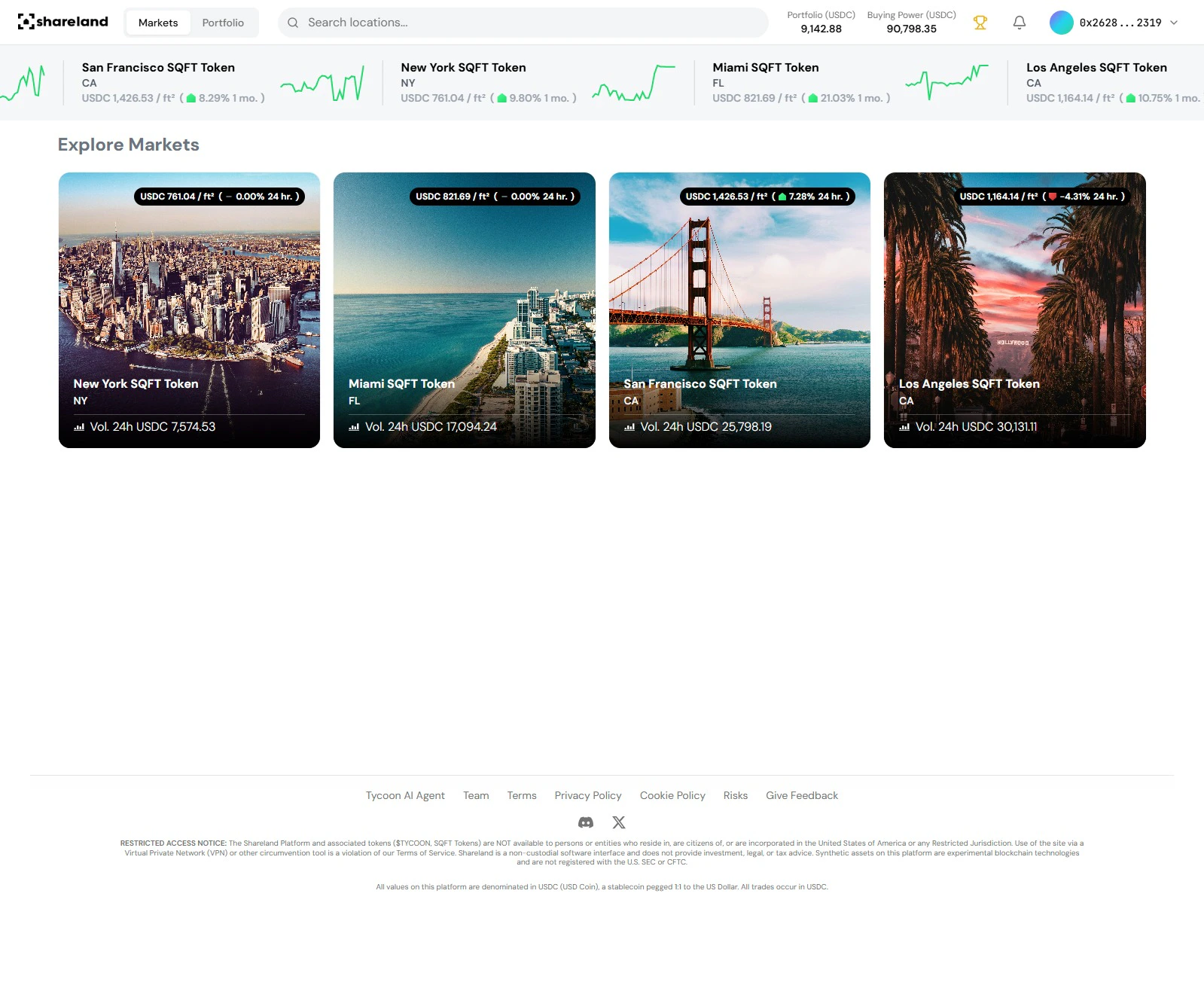
### Step 1: Open a market
From the exchange, click any market card to open the detail panel.
 ### Step 2: Open the Stake tab
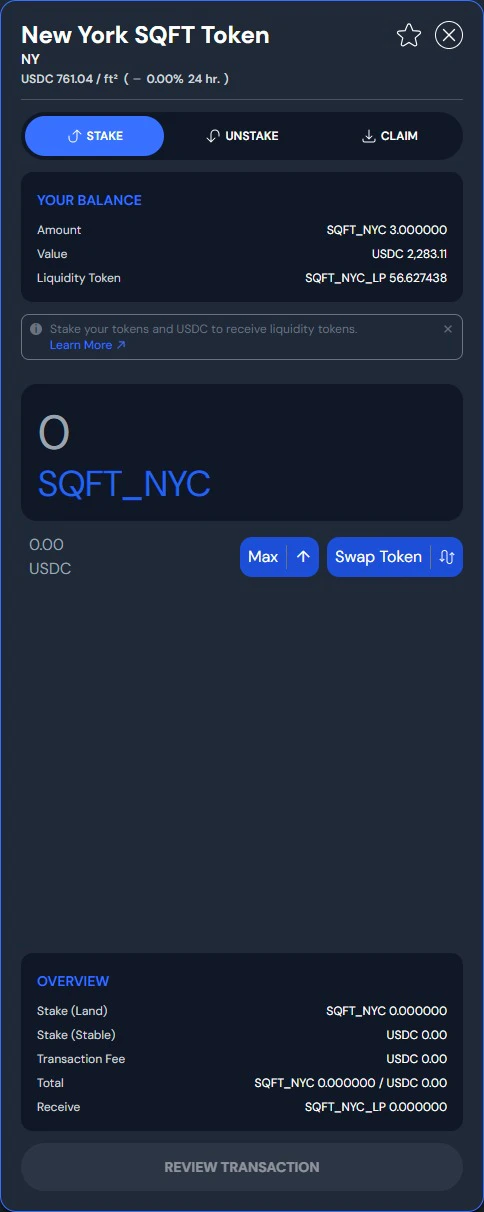
In the market detail panel, select the **Stake** tab.
### Step 2: Open the Stake tab
In the market detail panel, select the **Stake** tab.
 ### Step 3: Enter your amounts
Staking requires **two inputs**:
* **SQFT tokens** (Land) — the amount of SQFT tokens to deposit
* **USDC** (Stable) — the amount of USDC to deposit alongside
The panel shows the required ratio based on current pool composition. Enter one side and the other will auto-calculate, or adjust both manually.
### Step 4: Confirm
Review and confirm the transaction. You'll receive LP tokens representing your share of the liquidity pool. Your position is visible in your Portfolio.
Staking is two-sided liquidity provision. You are depositing both SQFT and USDC into the pool, which means your position is exposed to both assets. This carries different risk characteristics than simply holding SQFT tokens.
## How to Unstake
### Step 1: Open the Unstake tab
Navigate to the market where you have staked tokens and select the **Unstake** tab.
### Step 2: Enter the amount
Enter the number of LP tokens (or equivalent position) you want to withdraw from the pool. You will receive both SQFT tokens and USDC back in proportion to your pool share.
### Step 3: Confirm
Approve the transaction to withdraw your tokens back to your wallet.
## How to Claim Rewards
Rewards accumulate over time based on your staked position.
1. **Check Rewards:** View your accrued rewards in the **Portfolio** tab under **Staking Rewards**.
2. **Claim:** Click the **Claim** button to transfer USDC rewards to your wallet.
Staking rewards are distributed in USDC and can be claimed at any time from your Portfolio.
Track your staking rewards in Portfolio
### Step 3: Enter your amounts
Staking requires **two inputs**:
* **SQFT tokens** (Land) — the amount of SQFT tokens to deposit
* **USDC** (Stable) — the amount of USDC to deposit alongside
The panel shows the required ratio based on current pool composition. Enter one side and the other will auto-calculate, or adjust both manually.
### Step 4: Confirm
Review and confirm the transaction. You'll receive LP tokens representing your share of the liquidity pool. Your position is visible in your Portfolio.
Staking is two-sided liquidity provision. You are depositing both SQFT and USDC into the pool, which means your position is exposed to both assets. This carries different risk characteristics than simply holding SQFT tokens.
## How to Unstake
### Step 1: Open the Unstake tab
Navigate to the market where you have staked tokens and select the **Unstake** tab.
### Step 2: Enter the amount
Enter the number of LP tokens (or equivalent position) you want to withdraw from the pool. You will receive both SQFT tokens and USDC back in proportion to your pool share.
### Step 3: Confirm
Approve the transaction to withdraw your tokens back to your wallet.
## How to Claim Rewards
Rewards accumulate over time based on your staked position.
1. **Check Rewards:** View your accrued rewards in the **Portfolio** tab under **Staking Rewards**.
2. **Claim:** Click the **Claim** button to transfer USDC rewards to your wallet.
Staking rewards are distributed in USDC and can be claimed at any time from your Portfolio.
Track your staking rewards in Portfolio