> ## Documentation Index
> Fetch the complete documentation index at: https://docs.share.land/llms.txt
> Use this file to discover all available pages before exploring further.
# View Your Portfolio
> Understanding your Shareland portfolio dashboard.
Navigate to **Portfolio** in the top nav to see your full trading dashboard.
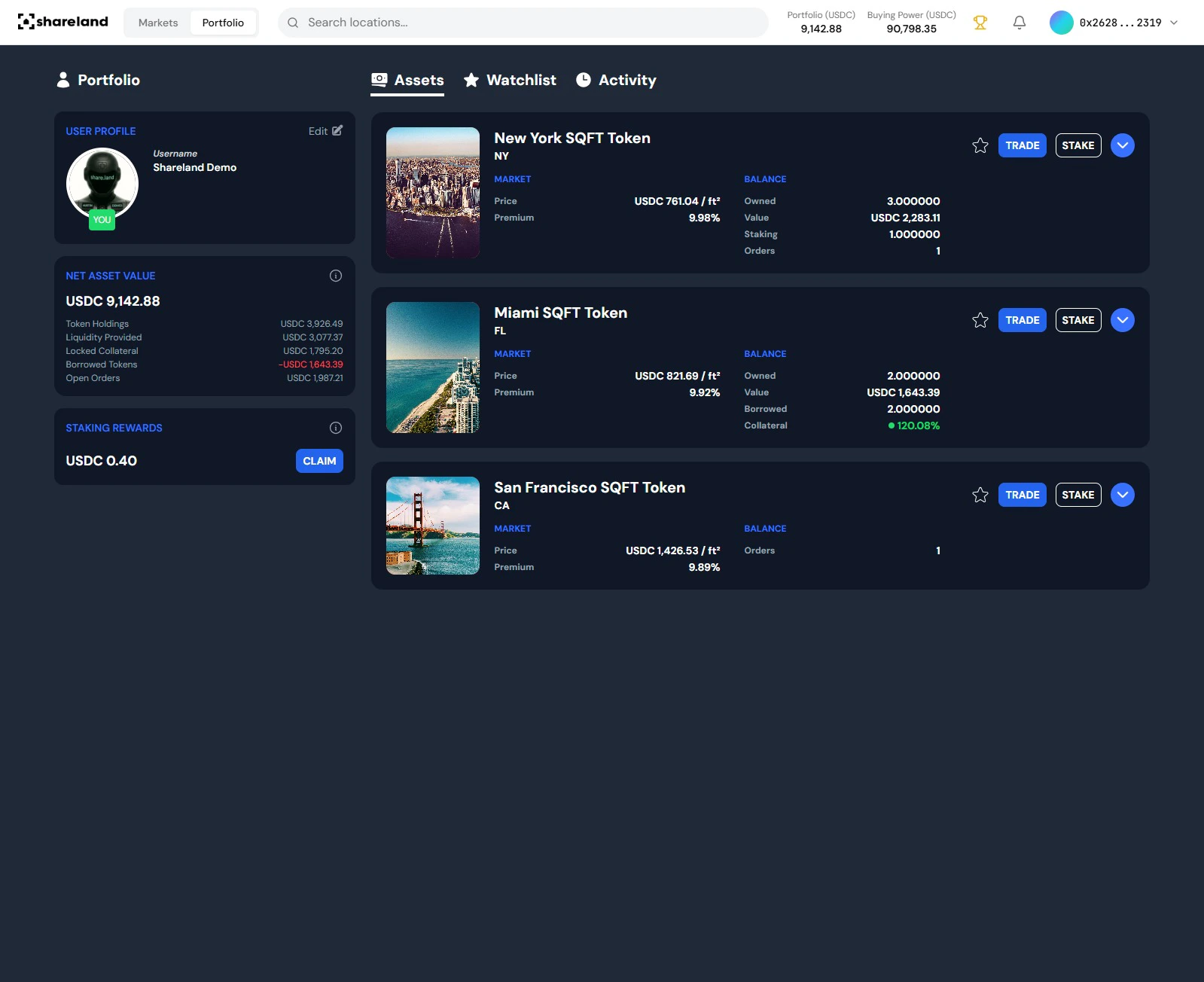 ## Portfolio tabs
| Tab | What you'll find |
| ------------- | ------------------------------------------------------- |
| **Assets** | All your open SQFT positions and their current value |
| **Watchlist** | Markets you're tracking but haven't traded yet |
| **Activity** | Full history of every buy, sell, and reward transaction |
## What's on the dashboard
**Portfolio Value** - total current value of all open positions in USDC, at live oracle prices. Updates in real time.
**Staking Rewards** - protocol revenue distributed to your wallet. Click **Claim** to withdraw at any time.
**Buying Power** - USDC available in your wallet to trade.
## Reading your positions
Each position in the **Assets** tab shows:
* **Market** - which SQFT token you hold (e.g. SQFT\_NYC)
* **Current value** - position value in USDC at the live oracle price
* **Gain/loss** - unrealized P\&L since your entry
## Transaction history
The **Activity** tab shows a full log of every trade, mint, burn, and reward claim, with timestamps, amounts, and fees paid.
Ready to build your portfolio?
## Portfolio tabs
| Tab | What you'll find |
| ------------- | ------------------------------------------------------- |
| **Assets** | All your open SQFT positions and their current value |
| **Watchlist** | Markets you're tracking but haven't traded yet |
| **Activity** | Full history of every buy, sell, and reward transaction |
## What's on the dashboard
**Portfolio Value** - total current value of all open positions in USDC, at live oracle prices. Updates in real time.
**Staking Rewards** - protocol revenue distributed to your wallet. Click **Claim** to withdraw at any time.
**Buying Power** - USDC available in your wallet to trade.
## Reading your positions
Each position in the **Assets** tab shows:
* **Market** - which SQFT token you hold (e.g. SQFT\_NYC)
* **Current value** - position value in USDC at the live oracle price
* **Gain/loss** - unrealized P\&L since your entry
## Transaction history
The **Activity** tab shows a full log of every trade, mint, burn, and reward claim, with timestamps, amounts, and fees paid.
Ready to build your portfolio?